
Add your sample folders.
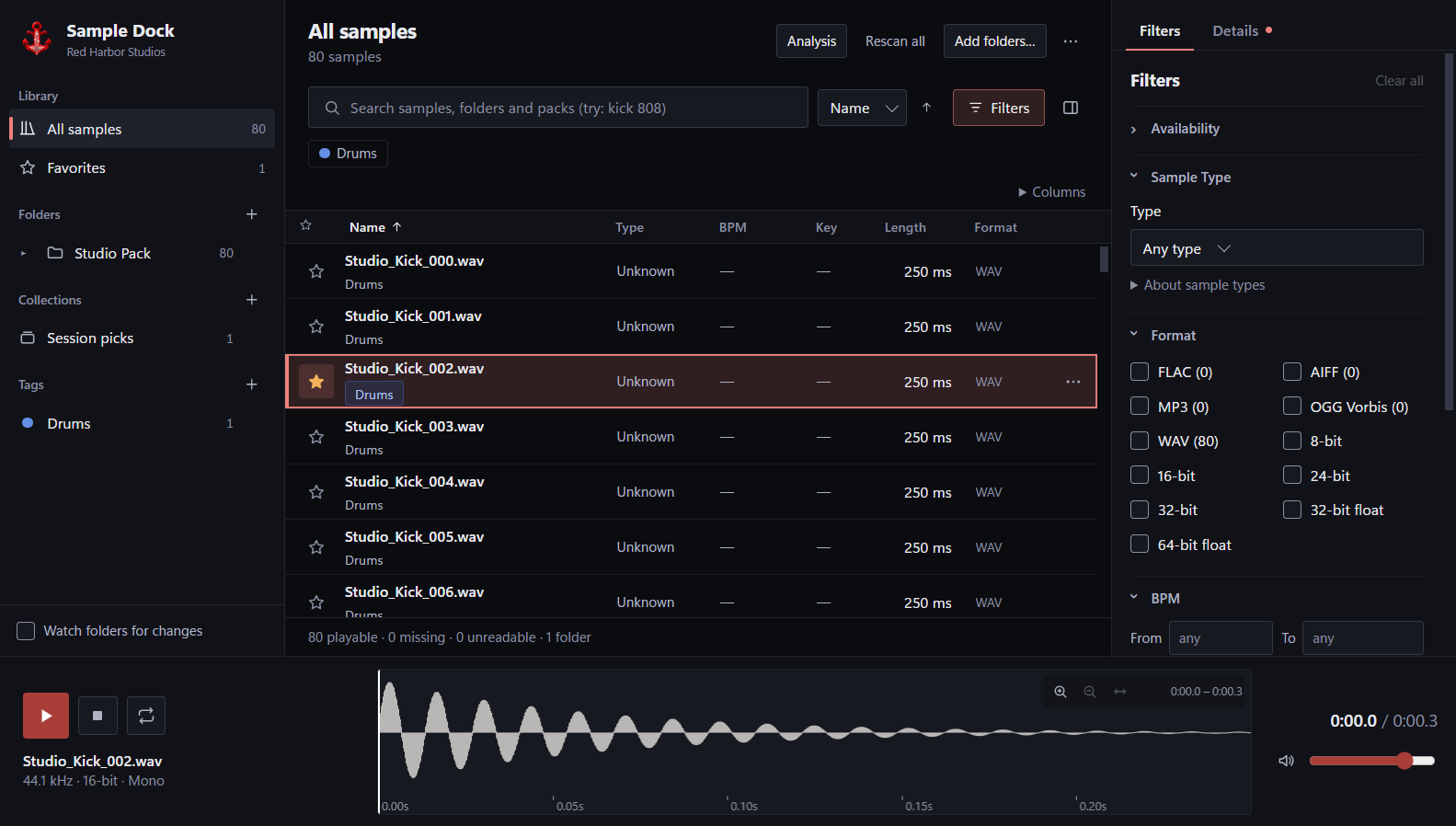
Add your existing folders. Manage tags, collections and local analysis. Keep the structure you already know.
Sample Dock / Public beta 0.7.2
Browse your samples without leaving your DAW.
Browse, search, preview and drag your samples from the desktop app or directly inside your DAW with the VST3 browser.
No account. No cloud upload. Your samples stay on your PC.
Desktop + VST3
Organize once in the desktop app. Keep the same sounds within reach when your DAW is open.
Add your existing folders. Manage tags, collections and local analysis. Keep the structure you already know.
Open the VST3 browser to search, filter, preview and drag samples into your session. VST3 browser currently tested primarily in FL Studio.
A browser that gets out of the way
Search, preview and drag from the library you already own.
Search across folders and filter your library without losing your place.
Nested folders, favorites, tags and collections. Bring several sample folders together, without moving your audio files.
Preview the waveform, seek, loop and set your listening level. Drag the sample into your DAW when it fits.
Local-first, by design
No account. No sample audio upload. No need to move your collection into a proprietary cloud library.
How local-first worksAdd folders from your existing library. Sample Dock indexes them locally and leaves your source audio in place.
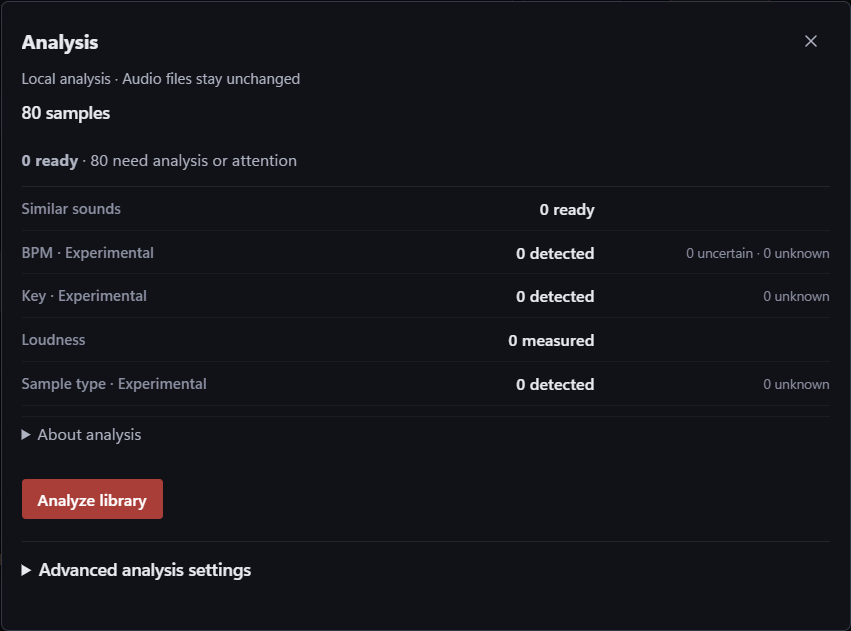
Optional audio analysis and similarity search run locally. Your sample audio is not sent to a server.
If you use cloud-backed folders, their availability and syncing remain controlled by your storage provider.
A little more context
Optional local analysis can detect useful metadata and power similarity search. Some features are still experimental during beta.
Find sounds similar to a sample you like. Use the results as a starting point, and trust your ears.
Free Windows beta
Sample Dock 0.7.2 Beta
Windows · Desktop + VST3 included.
Windows may show a SmartScreen warning because the beta installer is not yet code-signed.
Sample Dock is currently in public beta. Core browsing and playback workflows are stable, while some analysis features are still experimental.
Send beta feedback →C:\Program Files\Common Files\VST3. Windows asks for administrator permission for that component.Optionally compare this checksum with the downloaded installer using PowerShell:
Get-FileHash -Algorithm SHA256 -LiteralPath 'SampleDockSetup-0.7.2-unsigned.exe'Expected SHA-256:
86ccdd52d07507aa1d9ef41500768ddcd4a640419a76bd277e0d399070292f46A matching checksum confirms the file matches this release. It does not identify a signed publisher.
BPM detection, key detection, similarity quality and sample-type classification are Experimental. Check analysis results by ear.
VST3 browser currently tested primarily in FL Studio. Compatibility with other DAWs has not been verified.
A few things to know
Yes. The current Windows beta is free to use. The desktop app and VST3 browser are included.
No. Sample Dock indexes and analyzes audio locally. It does not upload your sample audio. If your folders use a cloud storage service, that service still controls its own syncing.
No account is required for the beta.
The beta supports WAV, FLAC, AIFF, MP3, OGG. Your files remain in your existing folders.
No. The VST3 browser reads the same local library managed by the desktop app. Your samples remain in their folders on your PC; they are not bundled into the plugin. Keep those files available when returning to a project.
The VST3 browser is currently tested primarily in FL Studio. Host-specific behavior is still part of beta testing.
The plugin uses VST3. Other VST3-compatible hosts may work, but broad DAW compatibility has not been verified. Test the beta in your own setup.
Windows may show a SmartScreen warning because the beta installer is not yet code-signed. Check the download source and compare the SHA-256 checksum before deciding whether to run it. Installing the VST3 in the system plugin folder requires administrator permission.
No. BPM and key detection are Experimental. Sample-type classification and similarity quality are also still experimental. Treat the results as browsing aids and check them by ear.